ASUS
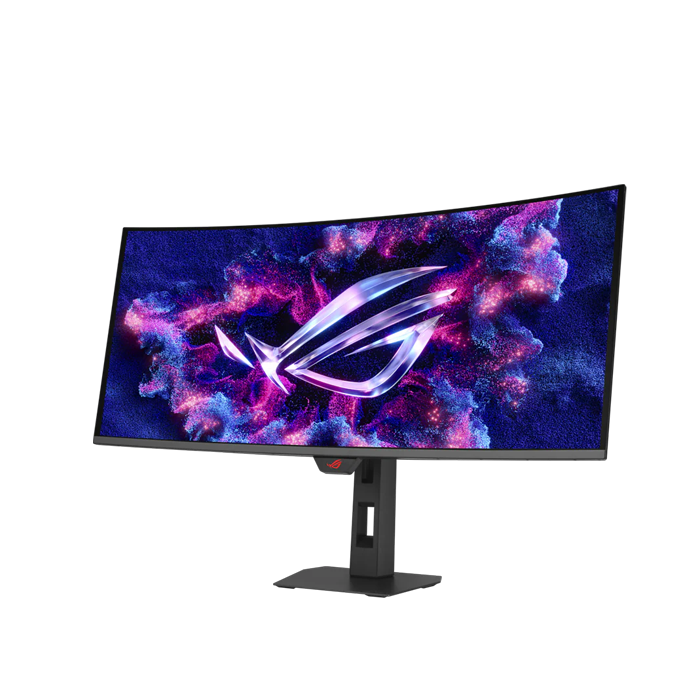
ASUS ROG STRIX XG34WCDMTG 34 Inch 240Hz WQHD HDMI 2.1 0.03ms QD OLED Curved Gaming Monitor - Black
ASUS ROG STRIX XG34WCDMTG 34 Inch 240Hz WQHD HDMI 2.1 0.03ms QD OLED Curved Gaming Monitor - Black
SKU: XG34WCDMTG
Have a question?
-
All orders are dispatched the next business day!
-
We will beat any price. We back all products with a 1 year guarantee.
Couldn't load pickup availability
|
ROG Strix OLED XG34WCDMTG Gaming Monitor Immersive Ultra-Wide OLED Gaming The ROG Strix OLED XG34WCDMTG is a 34-inch, 240Hz ultra-wide QD-OLED gaming monitor. With the addition of the Neo Proximity Sensor in the new ROG OLED Care Pro suite, the monitor transitions to a black screen when no user is detected, guarding against burn-in. The monitor also comes with built-in Google TV, giving you instant access to a vast library of streaming apps, movies, and shows. Enjoy your favorite entertainment and games seamlessly — all in one display, no external devices required. IMMERSIVE GAMEPLAY Designed for discerning gamers and professional creators, it offers a resolution of 3440x1440 and 1800R curvature for smooth and immersive gaming visuals. Entertainment you love Google TV™ brings together your streaming apps, so movies, shows, and live TV* are all in one place. ASUS OLED CARE PRO New ASUS OLED Care Pro technology provides a full set of customizable monitor settings to protect the OLED panel and ensure longevity. Plus, it includes the new Neo Proximity Sensor that detects your distance from the monitor and transitions to a black image when you’re away to safeguard the panel from burn-in. All settings can be easily managed via DisplayWidget Center. Neo Proximity Sensor The built-in Neo Proximity Sensor precisely detects your distance from the monitor. When you step away, the monitor transitions to a black image to protect against panel burn-in, and instantly restores onscreen content when you return. Detection distance can be customized to suit personal preference, ensuring maximum convenience and protection. *Please ensure that the monitor sensor is properly angled and cleaned by using the included microfiber cloth before activating the detection function. Pixel cleaning Recalibrates the screen when the monitor has been active for several hours―a process that takes just a few minutes and activates automatically when the monitor is turned off* SCREEN MOVE Pixel locations are slightly shifted periodically to help prevent burn-in, and users can choose between several movement levels. Boundary detection Dynamically detects the boundary of the black bars and reduces the brightness and also slightly shifts the pixel of the near borders. Worry-free OLED Monitor ROG OLED monitors are engineered to deliver stunning visuals for years to come. An innovative custom heatsink and a unique internal airflow improve cooling and reduce the risk of burn-in. Uniform brightness The Uniform Brightness setting can now be adjusted directly from the Google menu. This feature decreases peak brightness to maintain consistent levels for better viewing—even when the size of bright white windows changes—and makes marathon gaming sessions more comfortable for the eyes. MultiScreen With this feature, you can enjoy seamless cross-platform entertainment and control multiple devices using a single keyboard and mouse — no KVM switch required — while your phone stays connected and charges at the same time. SMOOTH AND RESPONSIVE The XG34WCDMTG features AMD FreeSync Premium Pro technology and NVIDIA® G-SYNC® compatibility, ensuring supersmooth, tear-free visuals with low latency. ROG GAMING AI TECHNOLOGY The ROG Gaming AI Assisant technology in XG34WCDMTG includes Dynamic Crosshair and Dynamic Shadow Boost, leveraging AI technology to help you practice more effectively to improve your gaming experience. PLAY IN ULTRAVIVID HDR Experience breathtaking HDR visuals with Dolby Vision and rich, room-filling audio from Dolby Atmos through the powerful built-in 5W speakers — delivering true cinematic immersion without the need for external speakers. Rich Connectivity Extensive connectivity options such as DisplayPort™ 1.4 with Display Stream Compression (DSC), HDMI® 2.1 , USB-C with 90-watt Power Delivery, and a USB hub provide support for a wide array of multimedia devices. Ergonomic stand The specially designed stand offers tilt, swivel, and height adjustments for the ideal viewing position. The display is also VESA wall-mount-compatible. |
||||||||||||||||||||||||||||||||||||||||||||||||||||||||||||||||||||||||||||||||||||||||||||||||||||||||||||||||||||||||||||||||||||||||||||||||||
Specification:
|
Description
Description
|
ROG Strix OLED XG34WCDMTG Gaming Monitor Immersive Ultra-Wide OLED Gaming The ROG Strix OLED XG34WCDMTG is a 34-inch, 240Hz ultra-wide QD-OLED gaming monitor. With the addition of the Neo Proximity Sensor in the new ROG OLED Care Pro suite, the monitor transitions to a black screen when no user is detected, guarding against burn-in. The monitor also comes with built-in Google TV, giving you instant access to a vast library of streaming apps, movies, and shows. Enjoy your favorite entertainment and games seamlessly — all in one display, no external devices required. IMMERSIVE GAMEPLAY Designed for discerning gamers and professional creators, it offers a resolution of 3440x1440 and 1800R curvature for smooth and immersive gaming visuals. Entertainment you love Google TV™ brings together your streaming apps, so movies, shows, and live TV* are all in one place. ASUS OLED CARE PRO New ASUS OLED Care Pro technology provides a full set of customizable monitor settings to protect the OLED panel and ensure longevity. Plus, it includes the new Neo Proximity Sensor that detects your distance from the monitor and transitions to a black image when you’re away to safeguard the panel from burn-in. All settings can be easily managed via DisplayWidget Center. Neo Proximity Sensor The built-in Neo Proximity Sensor precisely detects your distance from the monitor. When you step away, the monitor transitions to a black image to protect against panel burn-in, and instantly restores onscreen content when you return. Detection distance can be customized to suit personal preference, ensuring maximum convenience and protection. *Please ensure that the monitor sensor is properly angled and cleaned by using the included microfiber cloth before activating the detection function. Pixel cleaning Recalibrates the screen when the monitor has been active for several hours―a process that takes just a few minutes and activates automatically when the monitor is turned off* SCREEN MOVE Pixel locations are slightly shifted periodically to help prevent burn-in, and users can choose between several movement levels. Boundary detection Dynamically detects the boundary of the black bars and reduces the brightness and also slightly shifts the pixel of the near borders. Worry-free OLED Monitor ROG OLED monitors are engineered to deliver stunning visuals for years to come. An innovative custom heatsink and a unique internal airflow improve cooling and reduce the risk of burn-in. Uniform brightness The Uniform Brightness setting can now be adjusted directly from the Google menu. This feature decreases peak brightness to maintain consistent levels for better viewing—even when the size of bright white windows changes—and makes marathon gaming sessions more comfortable for the eyes. MultiScreen With this feature, you can enjoy seamless cross-platform entertainment and control multiple devices using a single keyboard and mouse — no KVM switch required — while your phone stays connected and charges at the same time. SMOOTH AND RESPONSIVE The XG34WCDMTG features AMD FreeSync Premium Pro technology and NVIDIA® G-SYNC® compatibility, ensuring supersmooth, tear-free visuals with low latency. ROG GAMING AI TECHNOLOGY The ROG Gaming AI Assisant technology in XG34WCDMTG includes Dynamic Crosshair and Dynamic Shadow Boost, leveraging AI technology to help you practice more effectively to improve your gaming experience. PLAY IN ULTRAVIVID HDR Experience breathtaking HDR visuals with Dolby Vision and rich, room-filling audio from Dolby Atmos through the powerful built-in 5W speakers — delivering true cinematic immersion without the need for external speakers. Rich Connectivity Extensive connectivity options such as DisplayPort™ 1.4 with Display Stream Compression (DSC), HDMI® 2.1 , USB-C with 90-watt Power Delivery, and a USB hub provide support for a wide array of multimedia devices. Ergonomic stand The specially designed stand offers tilt, swivel, and height adjustments for the ideal viewing position. The display is also VESA wall-mount-compatible. |
||||||||||||||||||||||||||||||||||||||||||||||||||||||||||||||||||||||||||||||||||||||||||||||||||||||||||||||||||||||||||||||||||||||||||||||||||
Specification:
|
Item Specifics
Item Specifics