Benq
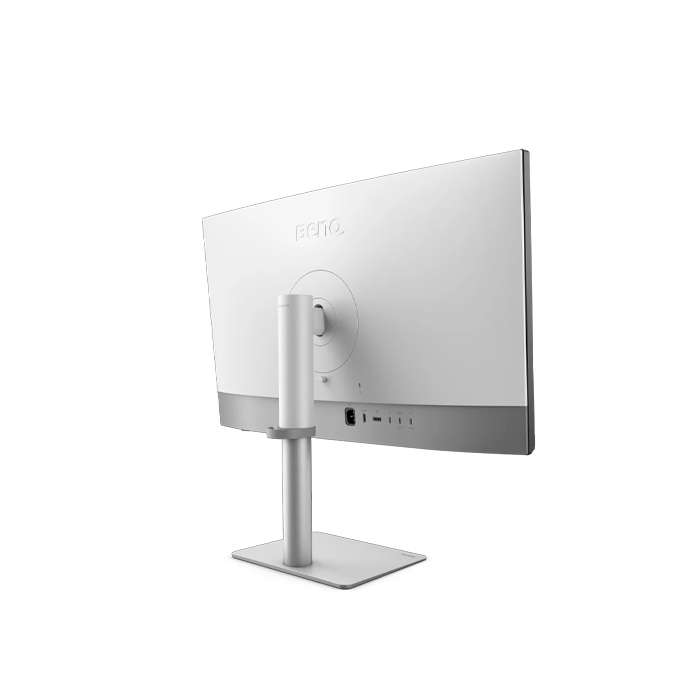
BENQ PD3226G - 32 Inch 4K UHD 144Hz 1ms HDMI 2.1 Gaming Monitor - Black
BENQ PD3226G - 32 Inch 4K UHD 144Hz 1ms HDMI 2.1 Gaming Monitor - Black
SKU: PD3226G
Have a question?
-
All orders are dispatched the next business day!
-
We will beat any price. We back all products with a 1 year guarantee.
Couldn't load pickup availability
|
BenQ DesignVue 31.5" 4K IPS Monitor 144Hz Refresh for Accurate Motion Clarity The 144Hz refresh rate enhances motion clarity, delivering ultra-smooth, accurate visuals essential for game designers. Optimized for game development, animation, and high-demand workflows. High-Refresh Compatibility for Precision Creation Compatible with high-refresh-rate drawing tablets and iPads, it delivers lifelike visual fidelity ideal for game and animation professionals like character designers, concept artists, animators, and VFX artists, who rely on precise, real-time accuracy for immersive creation and dynamic scenes. Colors You Can Trust BenQ AQCOLOR ensures 'Accurate Reproduction,' delivering out-of-the-box color precision with Delta E ≤ 2, 95% P3 wide color coverage, corner-to-corner uniformity, and a factory calibration report. All features are rigorously tested for consistency, providing designers with unparalleled precision and total color confidence. Pantone & Pantone SkinTone Validation Featuring Pantone and Pantone SkinTone validation, appealing to professionals who need a display that achieves the utmost authenticity when showing real-world colors. Calman Verified Every BenQ DesignVue designer monitor is fully CalMan Verified. Creative professionals demand excellence, and BenQ delivers. Pantone Connect Premium Go digital with BenQ, the first brand to work with Pantone on a mobile app. As an existing owner or a new purchaser of BenQ professional monitors, you get one year of free Pantone Connect Premium for digitally mobile color consistency and accuracy. Always Accurate and Consistent Colors Delivers long-term color accuracy and intuitive color management across displays, providing a reliable foundation for creators to craft authentic designs and refine every detail. Palette Master Ultimate Achieve More Precise Color Matching Offers effortless calibration with no experience needed. Follow visual menus and clear prompts for software calibration that meets international standards. Nano Matte Panels for Color Management & Eye Comfort The BenQ Nano Matte Panel diffuses ambient light, making it ideal for color-managed workflows. Its TÜV certified reflection-free feature enhances eye comfort during extended design sessions. All-in-One Thunderbolt 4 Connection Thunderbolt 4 seamlessly carries images, videos, and data while delivering up to 90W of power through a single cable. It supports ultra-fast 40Gbps data transfer and connects up to two 4K monitors or one 8K monitor. Thunderbolt 4 is fully compatible with USB-C. Daisy Chain The Daisy chain extends your workspace to dual 4K 144Hz monitors, thanks to high-speed transfer. Built-in KVM With built-in KVM (keyboard, video, mouse) switch functionality, the monitors allow users to control two systems from one keyboard and mouse set. Click to switch between to boost efficiency. Wireless Hotkey Puck BenQ Hotkey Puck simplifies monitor control with Display Pilot 2 sync, allowing you to directly configure shortcut functions. It offers three customizable keys for quick access to Color Mode, Input, DualView, KVM, or app launch. The rotation dial provides precise control over brightness, contrast, and volume—no menus needed. Ideal for creatives, it helps you stay focused without interruptions. ICCsync Ensures Color Consistency ICCsync automatically matches and syncs ICC profiles between your Mac and BenQ monitor when switching color modes. M-book Mode Mac Device Color Matching Exclusive M-book mode ensures a perfect match with Mac® and MacBook® Pro colors. iKeyboard Control Integrated MacBook Controls Effortlessly adjust display brightness using your Mac® keyboard. Unleash Creativity with Comfort Position your monitor for optimal comfort. With a variety of tilt, swivel, and pivot control points, whether you’re working on design or presenting your ideas to clients, there’s always the right spot and the right angle to do it. |
||||||||||||||||||||||||||||||||||||||||||||||||||||||||||||||||||||||||||||||||||||||||||||||||||||||||||||||||||||||||||||||||||||||||||||||||
Specification:
|
Description
Description
|
BenQ DesignVue 31.5" 4K IPS Monitor 144Hz Refresh for Accurate Motion Clarity The 144Hz refresh rate enhances motion clarity, delivering ultra-smooth, accurate visuals essential for game designers. Optimized for game development, animation, and high-demand workflows. High-Refresh Compatibility for Precision Creation Compatible with high-refresh-rate drawing tablets and iPads, it delivers lifelike visual fidelity ideal for game and animation professionals like character designers, concept artists, animators, and VFX artists, who rely on precise, real-time accuracy for immersive creation and dynamic scenes. Colors You Can Trust BenQ AQCOLOR ensures 'Accurate Reproduction,' delivering out-of-the-box color precision with Delta E ≤ 2, 95% P3 wide color coverage, corner-to-corner uniformity, and a factory calibration report. All features are rigorously tested for consistency, providing designers with unparalleled precision and total color confidence. Pantone & Pantone SkinTone Validation Featuring Pantone and Pantone SkinTone validation, appealing to professionals who need a display that achieves the utmost authenticity when showing real-world colors. Calman Verified Every BenQ DesignVue designer monitor is fully CalMan Verified. Creative professionals demand excellence, and BenQ delivers. Pantone Connect Premium Go digital with BenQ, the first brand to work with Pantone on a mobile app. As an existing owner or a new purchaser of BenQ professional monitors, you get one year of free Pantone Connect Premium for digitally mobile color consistency and accuracy. Always Accurate and Consistent Colors Delivers long-term color accuracy and intuitive color management across displays, providing a reliable foundation for creators to craft authentic designs and refine every detail. Palette Master Ultimate Achieve More Precise Color Matching Offers effortless calibration with no experience needed. Follow visual menus and clear prompts for software calibration that meets international standards. Nano Matte Panels for Color Management & Eye Comfort The BenQ Nano Matte Panel diffuses ambient light, making it ideal for color-managed workflows. Its TÜV certified reflection-free feature enhances eye comfort during extended design sessions. All-in-One Thunderbolt 4 Connection Thunderbolt 4 seamlessly carries images, videos, and data while delivering up to 90W of power through a single cable. It supports ultra-fast 40Gbps data transfer and connects up to two 4K monitors or one 8K monitor. Thunderbolt 4 is fully compatible with USB-C. Daisy Chain The Daisy chain extends your workspace to dual 4K 144Hz monitors, thanks to high-speed transfer. Built-in KVM With built-in KVM (keyboard, video, mouse) switch functionality, the monitors allow users to control two systems from one keyboard and mouse set. Click to switch between to boost efficiency. Wireless Hotkey Puck BenQ Hotkey Puck simplifies monitor control with Display Pilot 2 sync, allowing you to directly configure shortcut functions. It offers three customizable keys for quick access to Color Mode, Input, DualView, KVM, or app launch. The rotation dial provides precise control over brightness, contrast, and volume—no menus needed. Ideal for creatives, it helps you stay focused without interruptions. ICCsync Ensures Color Consistency ICCsync automatically matches and syncs ICC profiles between your Mac and BenQ monitor when switching color modes. M-book Mode Mac Device Color Matching Exclusive M-book mode ensures a perfect match with Mac® and MacBook® Pro colors. iKeyboard Control Integrated MacBook Controls Effortlessly adjust display brightness using your Mac® keyboard. Unleash Creativity with Comfort Position your monitor for optimal comfort. With a variety of tilt, swivel, and pivot control points, whether you’re working on design or presenting your ideas to clients, there’s always the right spot and the right angle to do it. |
||||||||||||||||||||||||||||||||||||||||||||||||||||||||||||||||||||||||||||||||||||||||||||||||||||||||||||||||||||||||||||||||||||||||||||||||
Specification:
|
Item Specifics
Item Specifics