Corsair
CORSAIR 6500D Airflow Tempered Case
CORSAIR 6500D Airflow Tempered Case
SKU: CC-9011259-WW
Have a question?
-
All orders are dispatched the next business day!
-
We will beat any price. We back all products with a 1 year guarantee.
Couldn't load pickup availability
|
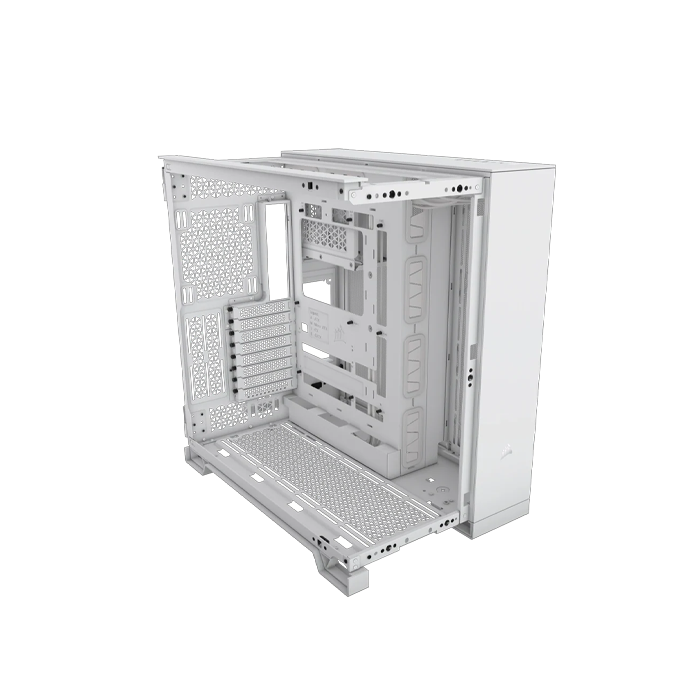
CORSAIR 6500D AIRFLOW Mid-Tower Dual Chamber PC Case The CORSAIR 6500D AIRFLOW Mid-Tower Dual Chamber PC Case delivers exceptional airflow and cooling with fully mesh paneling and a dual chamber design for an organized, stunning build. All the Design Choices You Can Think Of - Choose Your Adventure Freedom of choice inside and out. Choose your cooling setup: opt for more glass to showcase your components, or a more subtle airflow configuration – in more than just black or white. The Cleanest Look for Your Build Dual Chamber Design Show off your cleanest, most organized build in one chamber equipped with a multitude of fan and radiator mounts, while hiding cable routing, storage drives, and your PSU in the second chamber. Keep All Cables Out of Sight A Flawless View Take advantage of reverse connector motherboard compatibility (ASUS BTF, MSI PROJECT ZERO) and iCUE LINK and win the war on cables once and for all. Keep Your Temperatures in Check Unrivaled Airflow Optimal airflow and exceptional cooling thanks to fully mesh front, side, bottom, and roof paneling, ensuring stable performance for your high-end components. Shop the Look Your Case, Your Style Customize with a wide range of optional accessories for a setup that reflects your unique tastes. Wide Cooling Flexibility Customize your cooling setup with room for up to 13x 120mm or 9x 140mm fans, including versatile radiator mounting options for up to 360mm in the front, roof, bottom, and side. Dimension The 6500D AIRFLOW has more than enough space to accommodate and cool your most ambitious build. Fan Capacity Surround your system on all sides with a healthy amount of airflow to keep it running at its peak. Radiator Capacity Radiator mounting positions everywhere you look make the 6500D AIRFLOW a custom cooling dream. Modern Front Panel I/O Puts your connections within easy reach, including a USB 3.2 Gen 2 Type-C Port, 4x USB 3.2 Gen 1 Type-A ports, and a combination audio/microphone jack. 1_ Reset Button 2_ 4x USB 3.2 Gen 1 Type-A Ports 3_ USB 3.2 Gen 2 Type-C Port 4_ Headphone / Mic Combo Jack 5_ Power Button |
||||||||||||||||||||||||||||||||||
Specification:
|
Description
Description
|
CORSAIR 6500D AIRFLOW Mid-Tower Dual Chamber PC Case The CORSAIR 6500D AIRFLOW Mid-Tower Dual Chamber PC Case delivers exceptional airflow and cooling with fully mesh paneling and a dual chamber design for an organized, stunning build. All the Design Choices You Can Think Of - Choose Your Adventure Freedom of choice inside and out. Choose your cooling setup: opt for more glass to showcase your components, or a more subtle airflow configuration – in more than just black or white. The Cleanest Look for Your Build Dual Chamber Design Show off your cleanest, most organized build in one chamber equipped with a multitude of fan and radiator mounts, while hiding cable routing, storage drives, and your PSU in the second chamber. Keep All Cables Out of Sight A Flawless View Take advantage of reverse connector motherboard compatibility (ASUS BTF, MSI PROJECT ZERO) and iCUE LINK and win the war on cables once and for all. Keep Your Temperatures in Check Unrivaled Airflow Optimal airflow and exceptional cooling thanks to fully mesh front, side, bottom, and roof paneling, ensuring stable performance for your high-end components. Shop the Look Your Case, Your Style Customize with a wide range of optional accessories for a setup that reflects your unique tastes. Wide Cooling Flexibility Customize your cooling setup with room for up to 13x 120mm or 9x 140mm fans, including versatile radiator mounting options for up to 360mm in the front, roof, bottom, and side. Dimension The 6500D AIRFLOW has more than enough space to accommodate and cool your most ambitious build. Fan Capacity Surround your system on all sides with a healthy amount of airflow to keep it running at its peak. Radiator Capacity Radiator mounting positions everywhere you look make the 6500D AIRFLOW a custom cooling dream. Modern Front Panel I/O Puts your connections within easy reach, including a USB 3.2 Gen 2 Type-C Port, 4x USB 3.2 Gen 1 Type-A ports, and a combination audio/microphone jack. 1_ Reset Button 2_ 4x USB 3.2 Gen 1 Type-A Ports 3_ USB 3.2 Gen 2 Type-C Port 4_ Headphone / Mic Combo Jack 5_ Power Button |
||||||||||||||||||||||||||||||||||
Specification:
|
Item Specifics
Item Specifics